← Back to GuidesSetup
API Keys
API Keys are unique identifiers that allow you to send data to other websites securely. For Torn, you can use these in applications or extensions to enhance your gameplay.
You should have already created 1 API key for TornStats when signing up — the process is the same for any other website or application you want to use.
Creating an API Key
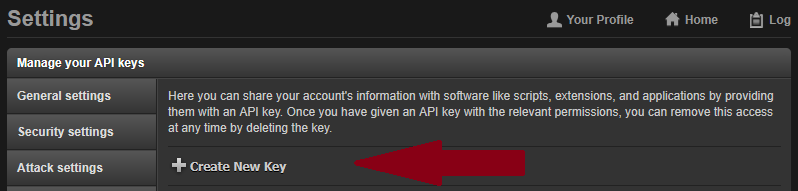
2
Set up the key
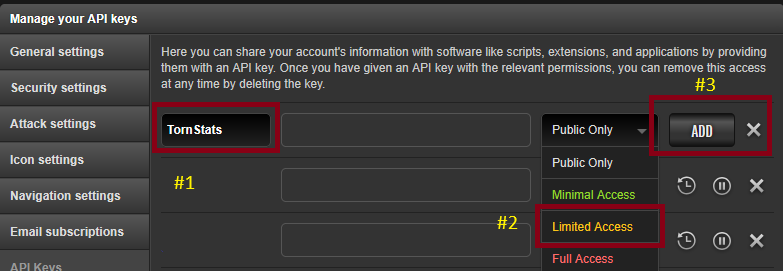
- ▸Name the key: Name of website/application
- ▸On the right side, click the dropdown where it says Public Only and choose Access Level
- ▸Click ADD
3
Copy your key
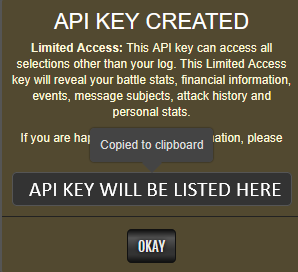
Your key will be displayed — click on it to copy it. You'll need this for the website or application you're setting up.
Access Levels
Torn API keys come in three access levels. Always match the key to the minimum access the tool needs.
PublicRead-only access to public player data. Safe for sharing.
Limited AccessRequired by TornStats. Grants access to your stats and faction data without exposing sensitive info.
Full AccessFull read/write. Only use this for trusted tools that explicitly require it.
Quick Tips
- ▸Never share a Full Access key — it can be used to perform actions on your account.
- ▸You can create multiple keys with different access levels for different tools.
- ▸If a key is compromised, delete it immediately from your Torn API settings page.